
1. Overview
Microsoft recently announced that GitHub Copilot harness is now generally available for production use in Copilot Studio. This release introduces a new term into the Copilot Studio vocabulary, and behind that term sits a change to how agents are authored, how they execute at runtime, how their behaviour is organised and how their usage is billed.
This briefing consolidates the product announcement, the Microsoft Learn documentation and the guidance published by the Microsoft Customer Advisory Team into a single reference. Each section is framed around the same question: what was the previous approach, and what replaces it going forward.
2. Understanding the Harness Concept
What a harness is
Running an agent involves three layers. The design is what gets built: instructions, knowledge, tools and the rest. The model supplies the reasoning and generation. The harness is the runtime that sits between the two.
Microsoft’s definition is that the harness determines when to call the model, what components to send it, how to interpret what comes back and which tool to call next. It is described as the software scaffolding that lets an agent plan, reason, maintain context and interact with tools.
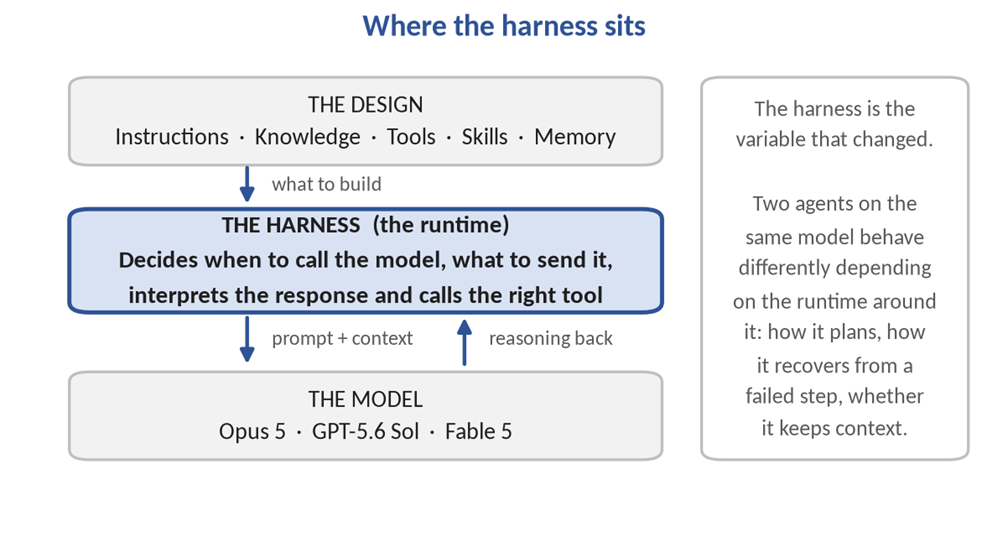
Figure 1. The harness is the runtime between the agent design and the model.
Previously that runtime was fixed and invisible. Agent capability was discussed almost entirely in terms of the model selected, because the model was the only variable exposed to the maker. Going forward, the runtime is a deliberate choice made at the point an agent is created. Two agents using an identical model can behave very differently depending on the harness around them: how it plans, whether it recovers from a failed step, whether it retains context between turns. Capability is now a property of the runtime as much as of the model.
Why a third option exists
Microsoft’s stated reasoning is that different harnesses can be optimised for different outcomes, so rather than relying on a single one-size-fits-all approach, Copilot Studio now lets the maker choose the harness that best fits the scenario. Three are available:
- The Copilot Chat harness, which uses the same harness as Microsoft 365 Copilot Chat and is intended for customising Copilot Chat experiences.
- The Standard harness, which most Copilot Studio agents use today and which suits conversational agents built on rules-based topics.
- The GitHub Copilot harness, which uses the GitHub Copilot SDK to automate complex, agentic business processes.
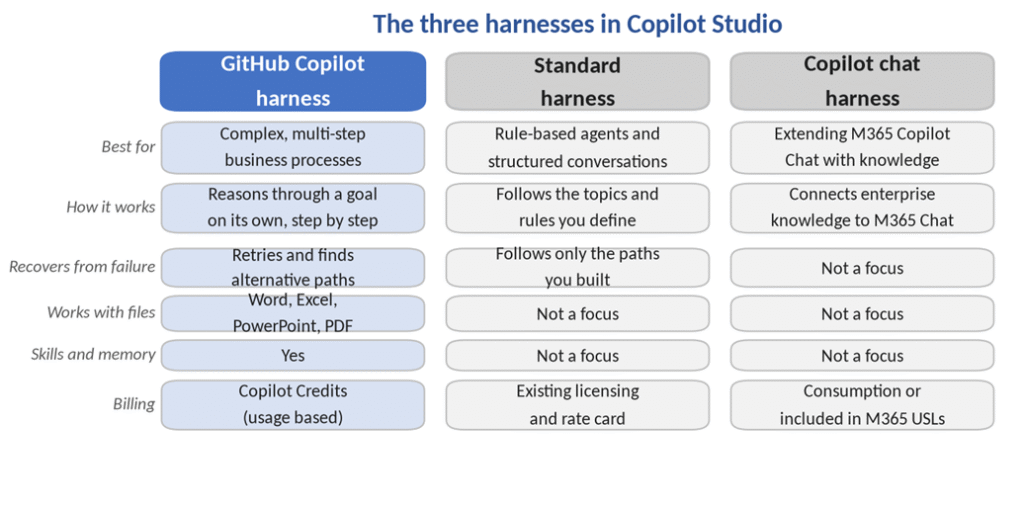
Figure 2. The three harnesses compared across the considerations that matter at design time.
3. The GitHub Copilot Harness
Definition and origin
Microsoft describes the harness as a redesigned authoring and runtime environment for building AI agents, introducing a natural-language-first approach to agent creation, a unified single-surface design and an enhanced orchestration model that improves response quality and reasoning capability.
Architecturally it is built on an enhanced orchestration runtime that replaces the standard model used in Copilot Studio’s standard harness agents. It is a replacement engine rather than a layer added on top of the existing one, which is why agents cannot be moved between the two.
The name reflects its origin. The harness carries across the coding and reasoning capabilities behind Microsoft’s most advanced agent experiences, specifically Copilot Cowork and the GitHub Copilot coding agent. That lineage explains its behavioural profile: a coding agent operates on a loop of plan, act, fail, recover and continue rather than a predetermined script, and the same loop is now applied to business processes.
Documented capabilities
- Rather than following only a fixed script, it takes a goal, breaks it into steps, calls the right tools across connectors, knowledge, MCP and connected agents, and adjusts when a step fails or a request changes.
- It natively creates and edits Word, Excel, PowerPoint and PDF files, supports skills and memory, and runs each task in a secure sandbox governed by Copilot Studio.
- It is built for complex, long-horizon work using the latest frontier reasoning models, including Opus 5, GPT-5.6 Sol and Fable 5.
- It can plan, reason through dynamic problems, run an agentic loop, use skills, integrate workflows, connect to tools and agents in other platforms, and produce rich, multi-part outputs.
The problem being addressed
Microsoft’s framing of the benefit is that agents can now handle work that used to be out of reach, including processes that have many steps, many sources and ambiguous decision points. The final phrase identifies the specific limitation being addressed. Trigger-phrase routing resolves known inputs to known paths; it cannot resolve ambiguity, because ambiguity has no trigger phrase to match against.
On measured outcomes, Microsoft states that testing against real-world business process evaluations showed significant performance and quality gains on this harness, with improvements in multi-tool use, file analysis, code analysis and knowledge quality.
4. How Agents Are Structured
The component model
An agent on this harness is organised around a set of core components, each configured from the Build tab. The separation between them is the foundation of the new design method.
| Component | Purpose |
| Instructions | Define the agent’s identity, tone, scope and behaviour |
| Knowledge | Connected data sources and memory that give the agent context for answering |
| Tools | Enable the agent to perform actions, such as calling APIs or running flows |
| Skills | Define reusable structured behaviours |
| Model | Select the AI model that powers the agent’s reasoning |
| Connected agents | Delegate specialised tasks to other agents |
| Memory | Retain details from interactions and apply that context in future ones |
What changes in practice
Previously, most behaviour was concentrated in one or two places: a large instruction block supported by a collection of hand-authored topics, flows and session variables. Diagnosing incorrect behaviour meant reading through the instruction field and the topic tree looking for the cause.
Going forward, responsibility is distributed across named components. The Customer Advisory Team states the design principle as follows: every behaviour belongs in the smallest component that makes it reliable and inspectable. Instructions carry what is always true, knowledge carries the searchable facts, tools carry the system actions, memory carries the persistent context, skills carry the situational procedures, and connected agents carry the genuine specialist domains. The anti-pattern they name is an agent built as a single instruction block with dozens of tools attached and no separation between them.
The operative word is inspectable. Component separation means a fault can be traced to a location rather than diagnosed by reading through one undifferentiated instruction field.
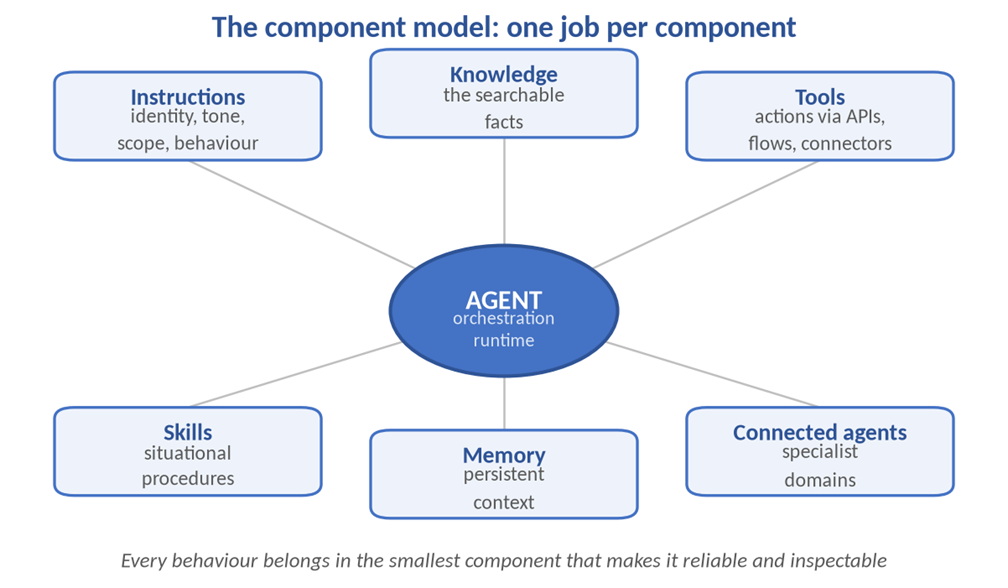
Figure 3. Responsibilities are distributed across named components rather than concentrated in one instruction block.
5. Skills Replace Topics
The shift
This is the change with the most direct effect on existing build practice. Microsoft’s documentation states that instead of authoring explicit conversation topics, flows and branching logic, the maker describes the agent in natural language and the system generates the underlying configuration.
Previously, a procedure was authored as a topic: a conversation path with trigger phrases, nodes and branching logic, built by hand in the designer and bound to the agent it was created in. Going forward, a procedure is authored as a skill, defined by a name, a description and a set of instructions written in Markdown. Skills tell the agent how to handle specific types of task or scenario, and the orchestration runtime invokes a skill when a user’s request matches its purpose.
Skills are distinct from tools. Tools connect to external services, whereas skills are self-contained sets of instructions and logic that can be created, shared and reused across agents. Microsoft characterises them as specialised roles or modes that an agent activates when needed.
Topics compared with skills
The two approaches differ across five dimensions, and the difference in reuse is the one with the greatest operational consequence.
| Aspect | Topics (standard harness) | Skills (GitHub Copilot harness) |
| Authored as | Conversation nodes and branches in a designer | Markdown instructions |
| Activated by | Trigger phrases defined by the maker | The runtime, based on the skill description |
| Reuse across agents | Tied to the agent it was built in | Created once and added to multiple agents |
| Sharing | Inside the agent only | Exported as a Markdown file or a package |
| Supporting files | Not applicable | Scripts, templates and reference documents |
A common procedure such as identity verification, approval routing or escalation handling was previously rebuilt in every agent that required it. Going forward it is authored once and attached wherever it is needed, which changes both the effort of building a portfolio of agents and the consistency of behaviour across them.
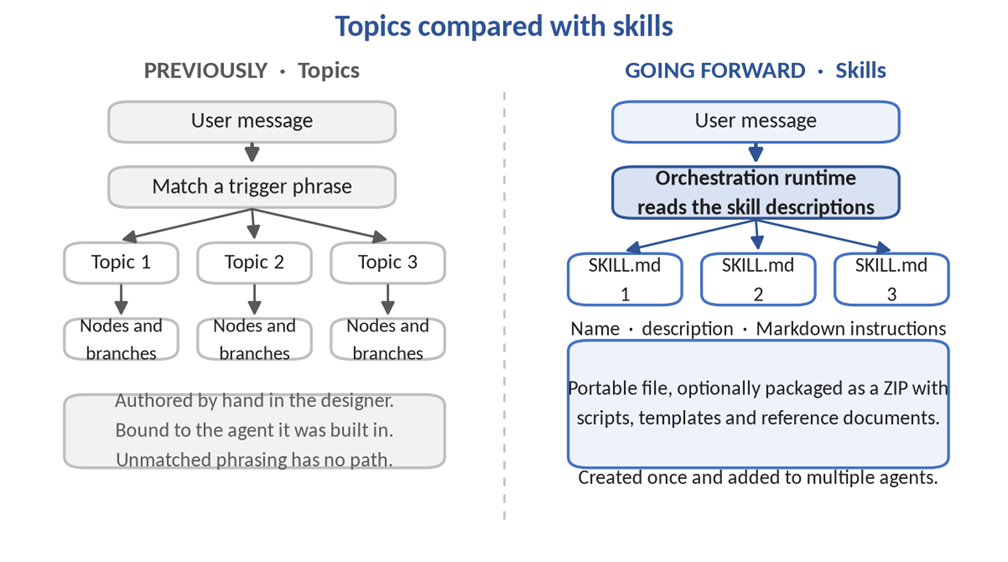
Figure 4. Routing moves from trigger phrases authored by the maker to descriptions interpreted by the runtime.
Skill files and packages
Skills follow a standard format: YAML front matter carrying the name and description, followed by the instructions. That format makes them portable and easy to share as Markdown files. They can be authored inside Copilot Studio, or written in any text editor and uploaded to an agent.
A skill package is a ZIP file containing a SKILL.md file with the YAML front matter and Markdown instructions, together with optional supporting files such as scripts, templates and reference documents. An existing skill can be added to an agent by uploading that package.
The downstream effect is that agent behaviour becomes text-based source. Version control, branching, pull requests, diffs and code review all become applicable to agent development, none of which could be applied cleanly to topics authored in a visual designer.
Descriptions are routing logic
Skills are activated by the runtime based on the skill’s description, not on trigger phrases defined by the author. Microsoft notes that well-written skill descriptions help the orchestrator invoke the right skill at the right time.
The practical consequence is that a description functions as routing logic rather than documentation. A description should state the conditions under which the skill applies, not only what the skill does. A vague description produces a skill that is never invoked, and there is no trigger phrase available as a fallback.
6. The Authoring Experience
The authoring surface
The new experience uses a tab-based layout, and the agent lifecycle runs from create, through build, test and publish, to monitor.
| Tab | Purpose |
| Build | Configure the agent’s identity, knowledge, tools, skills, model and memory |
| Preview | Test the agent interactively in a preview chat interface |
| Evaluate | Create and run test sets to measure agent quality |
| Monitor | Review recent tasks, files the agent accessed, and activity |
What changes in practice
On testing, structured evaluation of agent quality was previously an optional discipline maintained outside the product. Going forward, the Evaluate tab exists to create and run test sets that measure agent quality, which places evaluation inside the standard build loop rather than alongside it.
On observability, monitoring previously focused on conversation outcomes. Going forward, the Monitor tab reports recent tasks, the files the agent accessed and its activity. Where an agent can autonomously reach across knowledge sources and generate documents, visibility of data access becomes an audit requirement rather than a diagnostic convenience, particularly in regulated environments.
On the designers themselves, the agent designer is described as more intuitive for authoring, placing the most important tools within reach while retaining full agent lifecycle management. The workflow designer provides a visual canvas for understanding and editing workflows, including the addition of agent nodes and the running of workflow evaluations.
Announced but not yet generally available is natural language authoring, which will allow a business goal to be described and the appropriate combination of agents and workflows assembled through a multi-turn conversation.
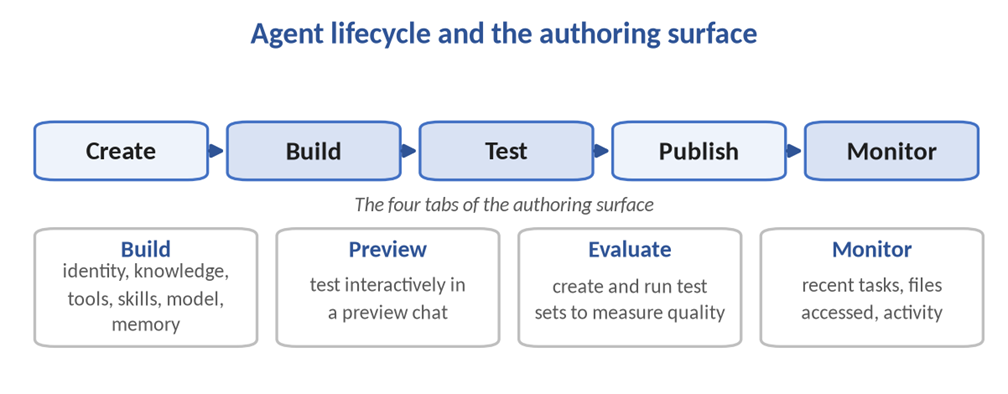
Figure 5. Evaluation and monitoring are part of the surface rather than disciplines maintained outside it.
7. Workflows
The deterministic counterpart
Workflows are the automation experience powered by the GitHub Copilot harness, built on a redesigned visual canvas with native AI actions, agent handoffs and node-level testing. Their defining property is determinism: workflows execute actions along a rule-based path, and the same input always produces the same output.
Previously, the division between conversational logic and automation was largely a division between topics and Power Automate flows, with limited visibility across the boundary. Going forward, the division is between reasoning and determinism, and both sides are first-class. Agents handle ambiguous, judgement-driven work, while workflows handle the steps that must execute identically every time. The Customer Advisory Team frames the benefit as workflows allowing automated processes to be built on a visual canvas with far more control over which steps are handled by AI.
That control is the design lever that makes the harness usable in regulated processes. Reasoning can be applied to exception analysis while calculation and posting steps remain deterministic and auditable.
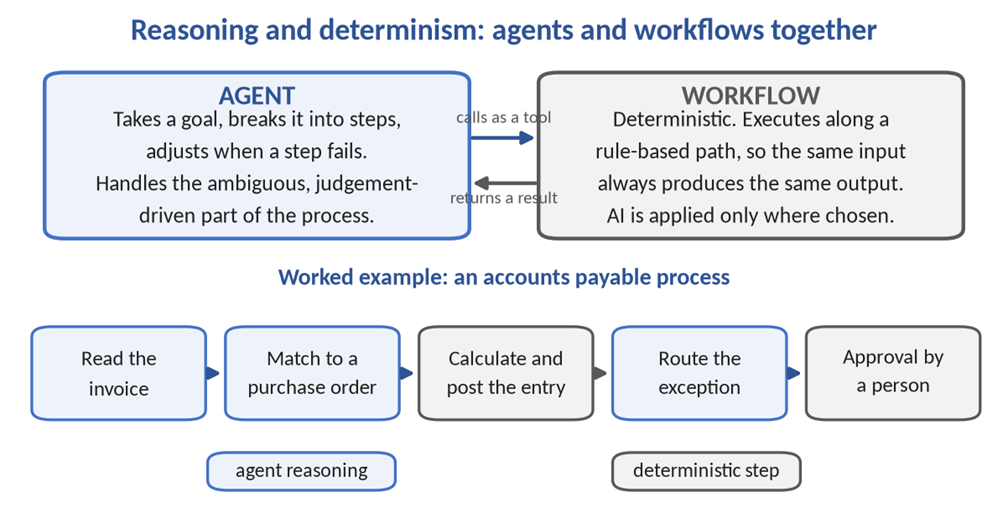
Figure 6. Reasoning and determinism are separated, and each side can call the other.
Composition
A workflow consists of a trigger and at least one action. Triggers can be instant and run manually on demand, scheduled, or fired by other events. Four categories of action are available.
| Action type | What it covers |
| AI capabilities | Generate text, process documents, run a prompt on a model, call an agent, and create a natural language reply to a calling agent |
| Human in the loop | Actions that require human intervention, such as requesting information |
| Built-in tools | Control structures for looping and branching, data operations, date and time functions, and child workflows |
| Connectors | Microsoft 365 services, third-party services and custom connectors |
The two sides integrate directly. A workflow using the trigger “When an agent calls the flow” can be added as a tool inside an agent, which allows an agent to hand deterministic work to a workflow and act on the result.
Capacity considerations
Workflows consume Copilot Studio capacity for each action they execute. Once an environment’s prepaid Copilot Studio capacity is fully consumed, new flow runs are blocked until capacity becomes available. Workflows already running complete normally, and Microsoft 365 Copilot licensed users and test runs are not affected. Testing a flow in the flow designer or from the agent’s test chat does not consume Copilot Studio capacity.
8. Choosing Between the Three Harnesses
The three harnesses differ across seven considerations that matter at design time. The table below reproduces the official comparison.
| Consideration | GitHub Copilot harness | Standard harness | Copilot chat harness |
| Best for | Complex, multi-step business processes | Rule-based agents and structured conversations | Extending Microsoft 365 Copilot Chat with enterprise knowledge |
| How it works | Reasons through a goal on its own, step by step | Follows the topics and rules you define | Connects enterprise knowledge to Microsoft 365 Copilot Chat |
| Recovers from problems | Retries and finds alternative paths automatically | Follows the paths you have built | Not a focus |
| Works with files | Creates, edits and reasons over Word, Excel, PowerPoint and PDF files | Not a focus | Not a focus |
| Skills and memory | Yes | Not a focus | Not a focus |
| Publishing | Internal teams or external customers | Internal teams or external customers | Internal teams |
| Billing | Copilot Credits, usage based | Existing Copilot Studio licensing and rate card | Consumption, or included in Microsoft 365 Copilot licences |
Selection guidance
Microsoft’s published guidance, with the documented example for each harness, is as follows.
- Select the GitHub Copilot harness when the agent needs to reason through longer tasks, work across several tools, handle files or automate a business process end to end. The documented example is an accounts payable process in which an agent or workflow reads invoices, matches them to purchase orders and routes exceptions for approval.
- Select the standard harness when the scenario is well defined and rule based and consistent, predictable answers are required. The documented example is an internal help desk that answers common questions and routes simple requests through a workflow.
- Select the Copilot chat harness when the objective is to extend Microsoft 365 Copilot Chat with organisational knowledge so that employees receive grounded answers without leaving their everyday experience. The documented example is an employee onboarding agent answering questions from SharePoint knowledge.
The standard harness is not being retired
Microsoft has confirmed continued support for both the Copilot Chat and Standard harnesses, for existing agents and for the authoring of new ones. Agents performing well on the standard harness do not need to be moved, and a straightforward question-and-answer agent gains little from frontier reasoning at frontier cost. Treating the new harness as a replacement for everything already built would be an expensive misreading of the announcement.
9. Consolidated Comparison
The following table summarises the differences between the established build method and the method that applies going forward.
| Dimension | Previously (standard harness) | Going forward (GitHub Copilot harness) |
| Unit of authoring | A topic, with trigger phrases, nodes and branching logic authored by hand | A skill, defined by name, description and Markdown instructions |
| Who plans the path | The harness follows the rules and steps defined by the maker | The harness takes a goal, breaks it into steps and adjusts as it proceeds |
| Failure handling | Follows only the paths that were built | Retries and finds alternative paths automatically |
| Orchestration | Orchestration behaviour is configurable | The enhanced orchestration model applies to all agents |
| Output artefacts | Chat responses and flow actions | Native creation and editing of Word, Excel, PowerPoint and PDF files |
| Multi-agent working | Limited | Connected agents delegate specialised tasks to other agents |
| State across sessions | Session-bound variables | Memory retains details for use in future interactions |
| Task isolation | Not applicable | Each task runs in a secure sandbox governed by Copilot Studio |
| Quality on M365 data | Baseline | Deep reasoning and higher-quality responses, particularly over Microsoft 365 data |
| Reuse of logic | Bound to the agent it was authored in | Skills created once and added to multiple agents |
| Billing start point | After publication | From the moment building begins |
Three of those rows warrant expansion. The removal of orchestration configurability is the first: on the standard harness, orchestration behaviour can be adjusted by the maker, whereas on this harness the enhanced orchestration model applies to all agents. That is less configuration in exchange for more capability, and it is a deliberate trade rather than an omission.
Native file generation changes the nature of the deliverable. The distinction is between an agent that reports what a reconciliation found and an agent that produces the reconciliation workbook. Memory changes the interaction model in a comparable way, since an agent that retains context between interactions supports categories of scenario that a session-bound agent cannot.
10. Licensing and Cost
Agents running on the GitHub Copilot harness use usage-based billing for all work, regardless of Microsoft 365 Copilot licensing. Cost is driven by the models chosen, the organisational context and tools added, and the runtime used.
A single meter covers the whole experience. Copilot Credits are charged for large language model tokens, for tools including knowledge sources and MCP servers, and for the harness itself. Any experience that uses one of those consumes credits, and there is no separate token meter to track alongside them.
Credits pool at the tenant level, which means an administrator must allocate them to individual environments before work can begin. Allocation and monitoring are handled through the Power Platform admin center. The number of credits an agent consumes depends on the design of the agent, how often it is used and the features it calls on.
The most significant change is the point at which billing starts. Previously, on the standard harness, billing began after publication. Going forward on this harness, credits are charged from the moment building starts. Creating a solution with natural language, previewing and testing an agent, and generating and running evaluations all consume credits. The documentation carries this as a standing note across articles: usage-based billing applies to using, building, testing and evaluating agents.
The planning consequence is that a project budget must account for the development cycle and not only for production runtime. Consumption can be observed in three places:
- Per agent, on the Monitor page in Copilot Studio, which shows the credits that agent has consumed.
- Per environment or tenant, in the Power Platform admin center under Licensing and then Copilot Studio.
- Before building, through the Copilot Studio agent usage estimator, which forecasts expected volume.
One point of frequent confusion is worth stating plainly: no GitHub licence is required. The name refers to the orchestration technology and creates no licensing dependency on GitHub. What is required is access to Copilot Studio, through a Copilot Studio user licence, the Copilot Studio authors role, a Microsoft 365 Copilot licence or a trial licence, together with allocated Copilot Credits.
On the other two harnesses, Microsoft 365 Copilot licensed users continue to benefit from fair use of Copilot Chat and Standard harness agents included in their licence, and all other usage continues to be billed against the existing fixed rate card.
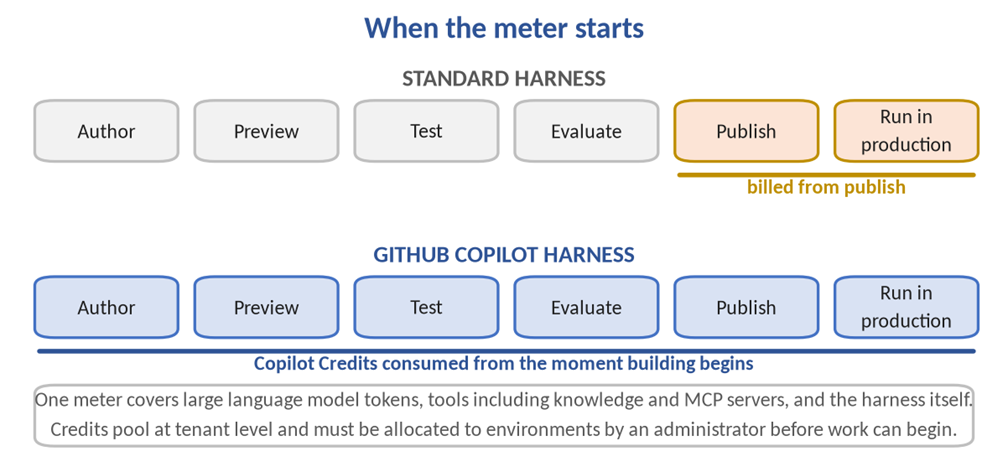
Figure 7. The point at which the meter starts is the single largest change to project budgeting.
11. Constraints to Plan Around
The harness decision cannot be reversed
The harness is selected when the agent is created. An agent created with the GitHub Copilot harness cannot be transferred to the standard harness, and the reverse is also blocked. This makes harness selection an architectural decision to be settled during design rather than a setting to be revisited later in the build.
Credit exhaustion halts all activity
When an environment has no allocated credits, or has consumed all of them, credit-dependent experiences stop. End users see agents stop responding, and makers cannot author with natural language, preview, test or generate evaluations. Production users and the build team are therefore affected simultaneously, so monitoring and alerting on credit consumption should be established before deployment rather than after the first interruption.
Existing estates have a transition date
Agents and workflows created before 3 August remain on the current pricing model until 1 September, after which they move to credit pricing. Standard harness agents remain fully supported. An inventory of the existing estate should be completed ahead of that date so that the cost impact is understood in advance rather than discovered on an invoice.
Further constraints
- A trial licence allows agents to be created and tested but not published, which is sufficient for proof-of-concept work and insufficient for a pilot rollout.
- Agent flows continue to run on the standard harness rather than the GitHub Copilot harness, despite the similarity in naming and their appearance on the same home page.
- Testing consumes credits on this harness, so the usage estimator should be run before work begins and the Monitor page watched during iteration.
12. Locating Each Harness in the Product
Each harness has its own entry point, and the three are easy to confuse on first use.
- GitHub Copilot harness: open Copilot Studio and switch the New experience toggle on, at the top right of the screen.
- Standard harness: switch the New experience toggle off, which returns the “What would you like to build?” page.
- Copilot chat harness: select Agents in the left navigation, choose Microsoft 365 Copilot from the list, open the Agents tab and select New agent.
To identify the harness behind an agent that already exists, select Agents in the left navigation and check the Powered by column.
13. Implications for Delivery
Previously, building well meant knowing the designer: topic structure, node types and variable scoping. Going forward it means assigning responsibilities correctly across instructions, knowledge, tools, memory, skills and connected agents. That is a separation-of-concerns discipline drawn from software engineering rather than from low-code development, and it changes the profile of the person best placed to lead a build.
The scope of what can be automated has also moved. Microsoft’s framing is that a more capable harness can handle longer, multi-step business processes across tools, files and intermediate decisions, and recover when something does not go as planned. In delivery terms that is the difference between an agent that answers questions about a process and an agent that executes it, which is a materially different conversation to have with a business sponsor.
Project sequencing changes accordingly. Consumption billing that begins at build time, tenant-pooled credits requiring administrator allocation, an irreversible harness decision at creation, and a hard stop when credits are exhausted are all matters to settle during planning rather than mid-pilot.
For a first build, a process with genuine complexity, involving multiple steps, several systems and real exceptions, will exercise the capability that justifies the harness. Rebuilding a straightforward question-and-answer agent consumes credits without testing anything the standard harness could not already do. The value case rests on the work that was previously out of reach.
14. Quick Reference
The table below summarises the facts most often needed when this release is discussed with a delivery team or a customer.
| Question | Answer |
| General availability date | 3 August 2026 |
| Is a GitHub licence required | No. Copilot Studio access plus allocated Copilot Credits |
| Can the harness be switched later | No, in either direction |
| Do topics exist on this harness | No. Skills replace them |
| Does building consume credits | Yes, from the moment building begins |
| Is the standard harness being retired | No. It remains fully supported for new and existing agents |
| Where is it enabled | The New experience toggle, top right of Copilot Studio |
| Transition date for existing agents | Items created before 3 August move to credit pricing on 1 September |
15. References
The following sources were used in the preparation of this briefing.
- Ryan Cunningham, More powerful agents and workflows for autonomous business processes: Introducing a new harness for Copilot Studio, Microsoft Community Hub, 3 August 2026. techcommunity.microsoft.com
- Choose a harness, Microsoft Learn, Microsoft Copilot Studio documentation. learn.microsoft.com/microsoft-copilot-studio/harnesses-overview
- Agents powered by GitHub Copilot: harness overview, Microsoft Learn, Microsoft Copilot Studio documentation. learn.microsoft.com/microsoft-copilot-studio/agents-experience/overview
- Skills overview for agents, Microsoft Learn, Microsoft Copilot Studio documentation. learn.microsoft.com/microsoft-copilot-studio/agents-experience/skills-overview
- Workflows overview, Microsoft Learn, Microsoft Copilot Studio documentation. learn.microsoft.com/microsoft-copilot-studio/workflows-experience/flows-overview
- Overview of billing for agents powered by the GitHub Copilot harness, Microsoft Learn. learn.microsoft.com/microsoft-copilot-studio/agents-experience/billing-credit-overview
- New Harness, New Rules? CAT’s Got You, Microsoft Customer Advisory Team, The Custom Engine, updated 2 August 2026. microsoft.github.io/mcscatblog/posts/new-orchestrator-resources
- Copilot Studio technical guide, the BlastBox Omega mini-site and deployable sample. microsoft.github.io/new-copilot-studio-tech-guide